What changes when a Model can ReAct
One request becomes many calls, tools, and decisions

I started my writing series in May with an idea that I couldn’t shake: CPUs were becoming central to AI infrastructure again because of agents.
Everything since has been building toward this chapter. The chips, the clusters, the training stack, the evals, and the inference economics. Agents are where all of it meets.
So let’s return to the original question. What exactly is an agent, and why does it change the shape of the workload?
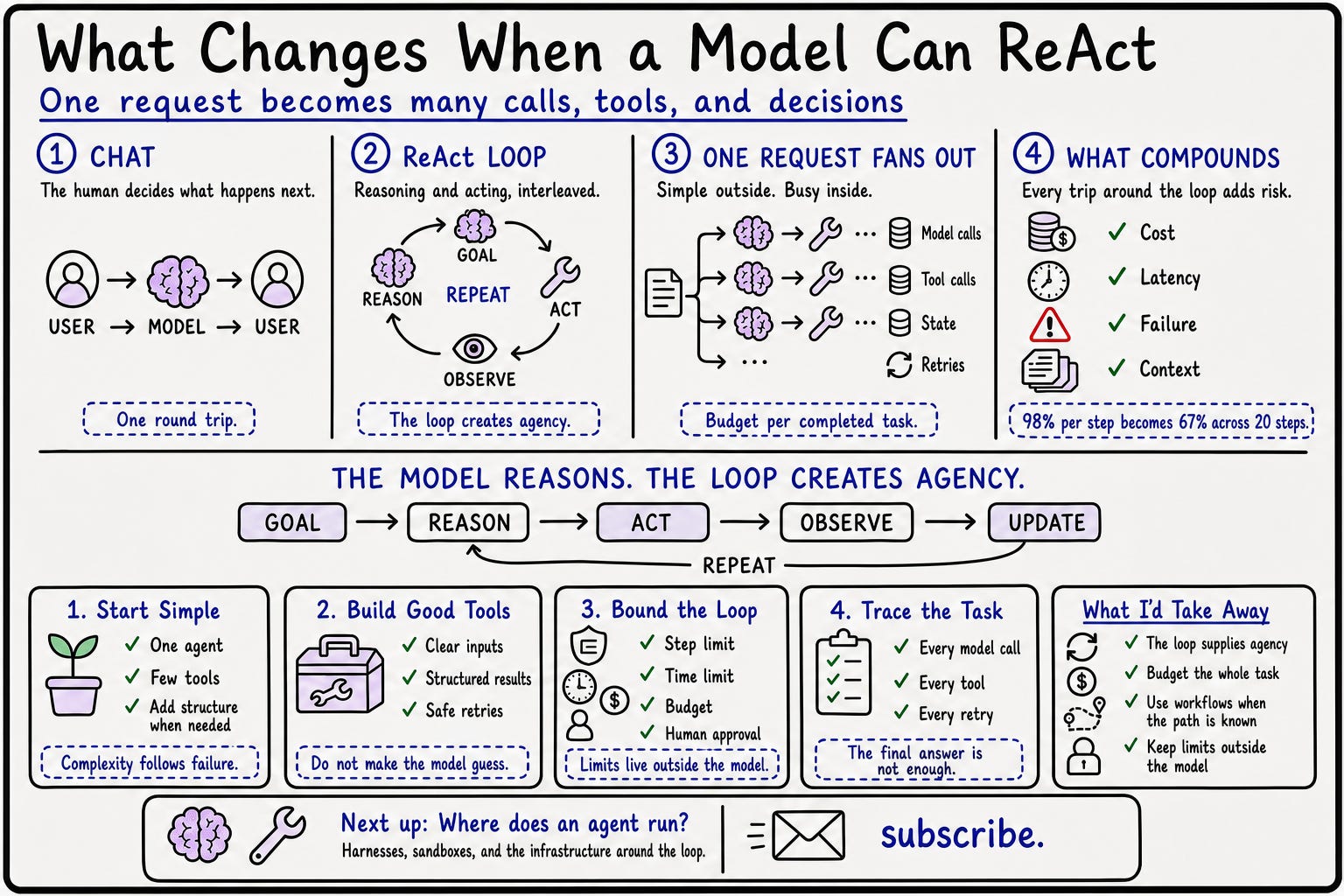
The loop
A chat interaction is one round trip. You send a prompt, the model returns text, and you decide what happens next.
An agent takes over that middle step. It gives the model a goal and the current state of the task. The model chooses an action. The system runs it, returns the result, and asks the model what to do next.
Goal → model → action → result → model again.
This pattern has a name: ReAct, short for reasoning and acting. The 2022 ReAct paper showed how a language model could interleave the two, act on the outside world, observe what came back, and update its plan. This became one of the clearest foundations for the modern LLM agent loop.
The loop continues until the task is finished or something outside the model stops it.
Consider a coding task. If you ask a chat model why a test is failing, it reads whatever you pasted and suggests a fix. You still have to open the file, make the change, run the test, and decide what to try if it fails again.
Ask an agent to fix the test and it can do those steps itself. It reads the files, edits the code, runs the test, sees the failure, and tries again.
The model provides the reasoning. The loop lets that reasoning cause another action.
That is where agency comes from.
One request fans out
From the user’s side, “fix this test” is one request. Inside the system it might become fifteen model calls, six tool calls, three failed attempts, and a final validation run.
This changes the cost math we discussed before. Each pass around the loop may include the original instructions, the available tools, what the agent has already tried, and the results it has collected. The context grows as the task runs. A careless prompt wastes tokens once in chat. In an agent, it wastes them every time the loop comes around.
Latency stacks too. The system waits for a model call, then a tool, then the model again. Each step may be quick while the full task still takes several minutes. Time to first token tells us only part of the story. The user is waiting for the job to finish.
Reliability follows the same pattern. Suppose each step succeeds 98 percent of the time. That sounds good. Across twenty required steps, the chance that every step succeeds is only about 67 percent.
Agent demos are easy because they usually show one clean path. Production includes timeouts, expired credentials, malformed tool responses, duplicate actions, and a model that occasionally makes a strange decision halfway through the task.
What sits around the loop
The basic loop is simple. A production agent needs more around it.
It needs tools through which it can act. It needs state so the tenth iteration remembers what the second one discovered. It needs orchestration that carries results from one step to the next. It also needs rules for when to stop, when to retry, and when to ask a person for help.
It is tempting to begin with a planner, several worker agents, a critic, and a complicated handoff system. That gives you five things to debug before you know whether one simple loop could have done the job.
Start with one agent and a small set of tools.
If it repeatedly loses track of the plan, add planning structure.
If it produces plausible work but misses obvious errors, add a review step.
If parts of the task can genuinely run independently, then consider multiple workers.
Add complexity when a failure teaches you why it is needed.
The tools matter
An agent with a strong model and vague tools will still struggle.
The model should not have to guess which fields are required, whether an action succeeded, or what an error message means. Good tools have clear inputs, structured results, sensible timeouts, and useful failures.
The system also needs to know whether a retry is safe. Searching twice is usually harmless. Sending the same email or making the same payment twice is not.
The quality of an agent depends on the model, but it also depends heavily on the environment we give the model to work with. Better tools often improve the system more than a more capable model does.
The loop needs an outside boundary
The model should not be the only thing deciding whether it has finished.
Every run needs a step limit, a time limit, and a budget. Without them, a confused agent can keep searching, retrying, and spending money without getting closer to the goal.
Consequential actions need a boundary too. Reading a file and drafting an email are different from deleting the file or sending the message. The latter deserve explicit permission, even if the agent is confident.
Every step also needs to be visible afterward. The final answer is not enough. You need to know which models were called, which tools ran, where retries happened, and why the agent chose its path.
A correct result can still hide ten unnecessary calls or a lucky recovery from a bad decision.
The solutions architect lens
I would measure the full run as one unit.
How long did the task take?
What did it cost?
How many calls and retries did it need?
Did it finish on its own, stop at a limit, or require a person to rescue it?
I would also ask whether the problem needs an agent in the first place. If the same steps always happen in the same order, a normal workflow will be cheaper and easier to debug.
Put a model into the workflow where judgment is useful. Give the model control of the workflow only when the next step genuinely depends on what it discovers.
A chat model gives you an answer. An agent keeps working with the answer.
What I’d take away
The model supplies the intelligence. The loop supplies the agency. Tools and persistent state allow the model’s answer to trigger another action.
One request can become many calls. Cost, latency, context, and failure all grow as the loop continues. Measure the completed task, not one model call.
Start with the simplest loop that works. Add planners, critics, or multiple agents only when a specific failure shows why they are needed.
The loop needs limits outside the model. Step limits, budgets, traces, and human approval are what make an agent acceptable in production.
Next week: where does an agent actually run? We’ll look at the harness around the loop, why agents need isolated sandboxes, and the infrastructure that keeps tools, state, permissions, and failures under control.
If you want it in your inbox, subscribe.